
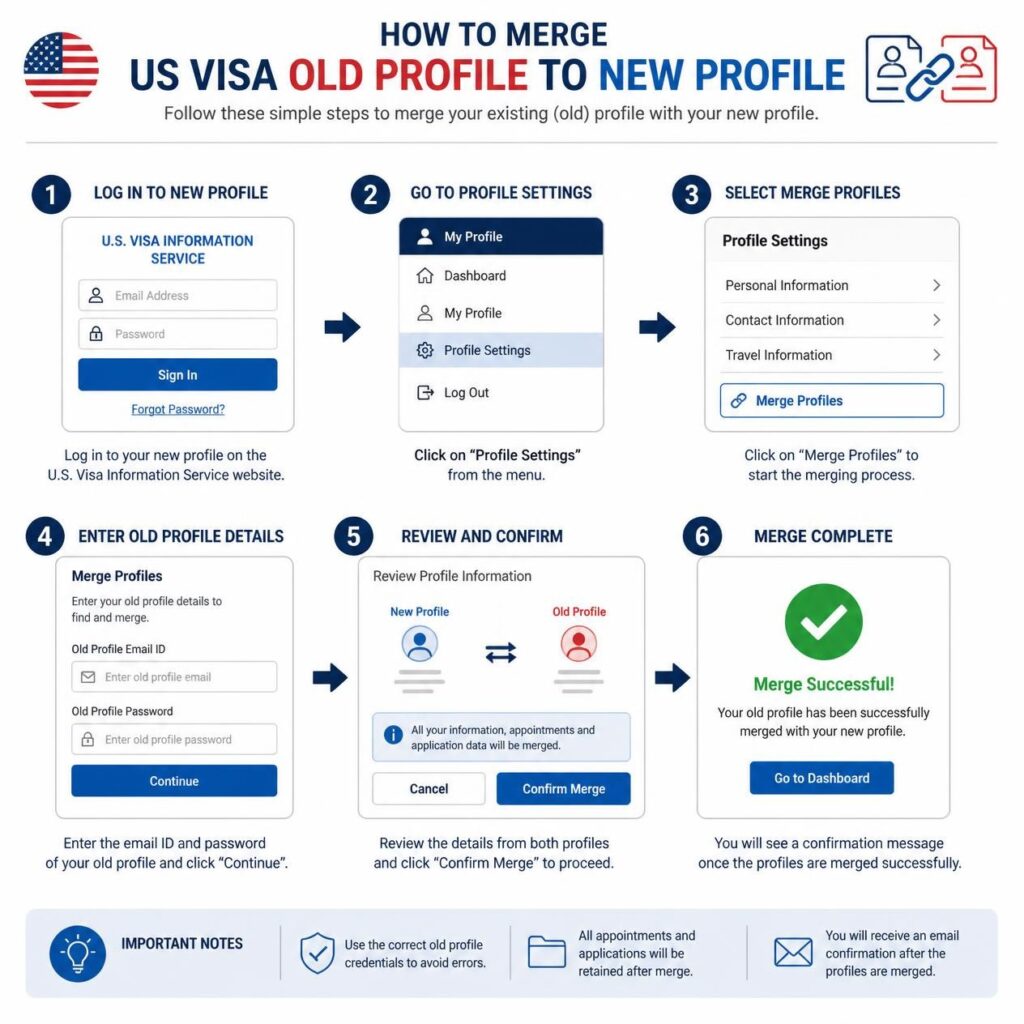
How to Merge USVisa Old Profile to New Profile: Have you accidentally created a new U.S. visa profile even though you already have an old profile? Are you worried that your previous appointment, visa fee payment, passport information, or application details may be connected to the old account? If you are searching for how to merge an old U.S. visa profile to a new profile, you are not alone.
Many U.S. visa applicants create more than one profile because they forget their login information, change their email address, experience a technical problem, or misunderstand the difference between a visa application and a visa appointment account. The problem often becomes more confusing when an applicant discovers that their passport number, payment receipt, or appointment information is already connected to the old profile.
Fortunately, creating a new profile does not automatically mean that your entire visa application process is lost. However, you should handle the situation carefully. Creating multiple accounts, making unnecessary payments, cancelling an existing appointment, or entering incorrect information can create additional complications.
In this detailed guide, we explain how to merge a USVisa old profile to a new profile, what to do if you have duplicate accounts, how to recover an old profile, what happens to your appointment and visa fee, how DS-160 information relates to your profile, and when you should contact official visa appointment support.
Whether you are applying for a B1/B2 visitor visa, F-1 student visa, J-1 exchange visitor visa, H-1B work visa, or another U.S. visa category, understanding how to manage duplicate profiles can help you avoid unnecessary delays and confusion.
What Does It Mean to Merge an Old USVisa Profile With a New Profile?
The phrase “merge USVisa old profile to new profile” can mean different things depending on the applicant’s situation.
Some applicants want to merge profiles because they have:
- An old account connected to a previous visa application.
- A new account created with a different email address.
- An appointment scheduled through the old account.
- A visa fee payment associated with the old profile.
- A passport number already registered in the old account.
- A previous DS-160 confirmation number connected to appointment information.
- A family or group appointment created through the old profile.
- Difficulty accessing the original account.
However, it is important to understand that “merging” may not always mean combining two accounts into one with a simple button. The actual solution may be to recover the old profile, update information, correct a duplicate record, transfer certain information, or continue using the original account.
The exact process can depend on the country where you are applying and the specific visa appointment system being used. The U.S. Department of State instructs applicants to follow the country-specific instructions of the U.S. Embassy or Consulate where they will apply. The DS-160 is also a separate part of the visa process from appointment scheduling. The official DS-160 guidance explains that applicants must complete the online application and then follow the applicable appointment and fee instructions for the location where they will apply.
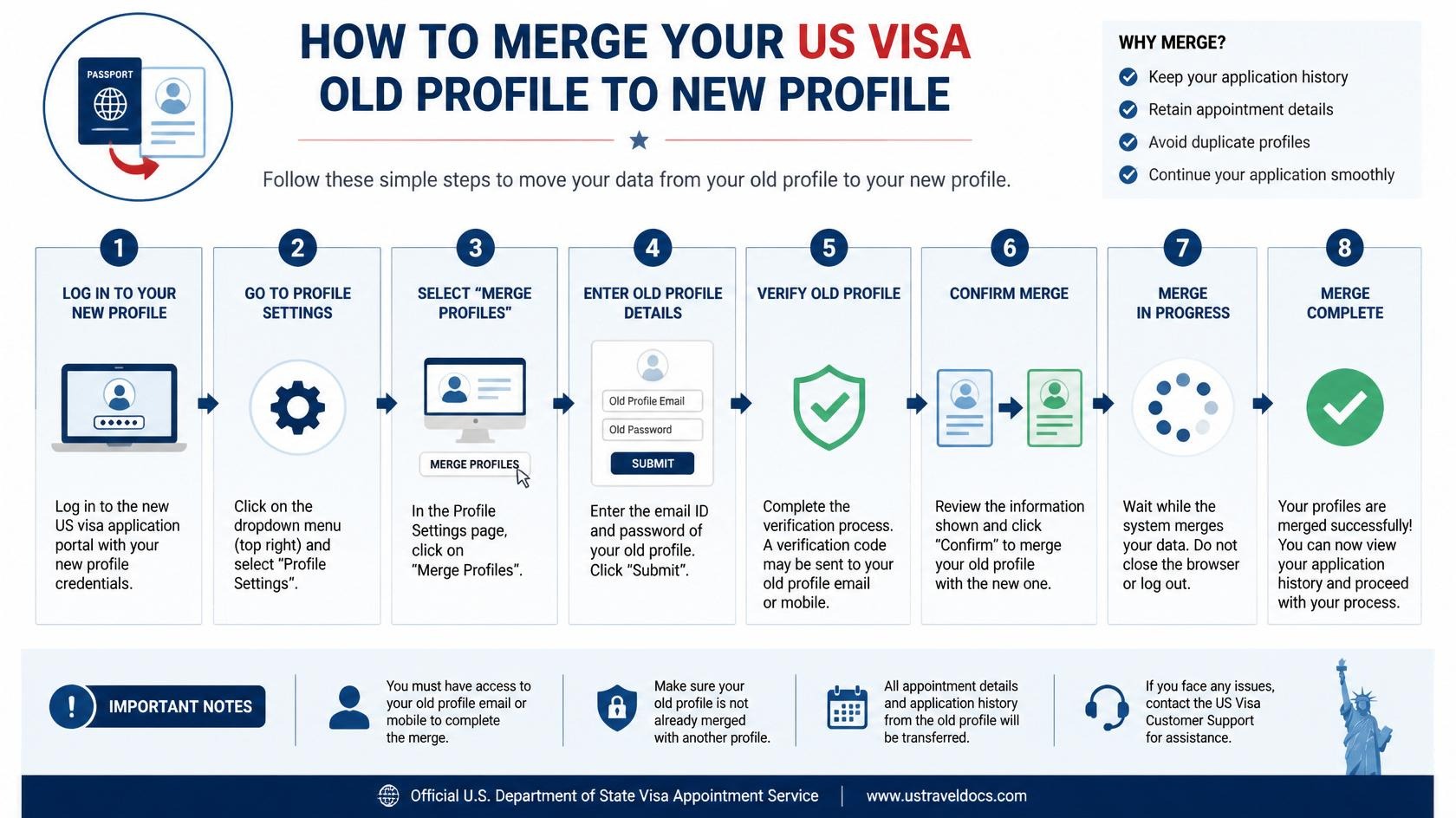
The short answer is: it depends on the specific visa appointment system and your situation.
There is no universal procedure that works for every U.S. visa applicant in every country. Some account issues can be resolved through password recovery or profile updates. Other situations require contacting the official visa appointment support team.
Before requesting a merge, consider the following questions:
- Does the old profile have an active appointment?
- Was the visa application fee paid through the old profile?
- Is your passport number already linked to the old account?
- Do you still have access to the old email address?
- Are the personal details identical in both profiles?
- Did you create the new profile accidentally?
- Is the new profile connected to a new DS-160?
- Are you applying in the same country and at the same U.S. Embassy or Consulate?
The answers to these questions can help determine the most appropriate next step.
In many situations, the safest approach is not to create additional accounts. Instead, identify the account containing the important information and try to recover or correct that profile.
Why Do Applicants Create Multiple USVisa Profiles?
Duplicate profiles are common because the U.S. visa application process involves multiple online systems and different steps. Applicants may not always understand which account is used for the DS-160 and which account is used for appointment scheduling.
1. Forgetting the Old Login Information
One of the most common reasons applicants create a new profile is that they cannot remember their old password or email address.
Some applicants assume that creating a new account is the fastest solution. However, if the old account contains an appointment or payment record, creating a second account may create additional problems.
Before creating a new profile, check old emails, appointment confirmations, payment receipts, and password recovery options. You may be able to regain access to the original account.
2. Changing Your Email Address
Applicants may create a new profile after changing their email address. For example, a student may have used a university email address in the past and later switch to a personal email address.
Similarly, an employee may have created an account using a work email address but later lose access to that email account.
If your old profile is connected to an email address you no longer use, do not immediately create multiple replacement accounts. First, determine whether the account can be recovered or whether the official support team can help update the account information.
3. Technical Problems With the Visa Website
Technical errors are another common reason for duplicate accounts.
An applicant may experience:
- A login error.
- A password reset problem.
- A page that does not load correctly.
- An error when entering a passport number.
- A problem updating a DS-160 confirmation number.
- A payment-related error.
- A system message saying that information is already in use.
Creating a new account may appear to solve the immediate problem, but it can also create duplicate records. If the system is experiencing a temporary technical issue, the better solution may be to wait, try the official recovery process, or contact support.
4. Applying for a New Visa
Some applicants create a new profile when applying for a new visa after a previous application.
For example, a person may have applied for a B1/B2 visitor visa several years ago and later decide to apply again. The applicant may assume that a completely new profile is required.
Whether a new profile is necessary depends on the applicable appointment platform and country-specific procedures. Applicants should check the current instructions before creating duplicate accounts.
5. Incorrect Personal Information
An applicant may create a new account because the old profile contains a spelling error, incorrect passport number, wrong date of birth, or another mistake.
However, creating another account does not necessarily correct the original error. In many situations, requesting an official correction may be a better solution.
How to Merge USVisa Old Profile to New Profile: Step-by-Step Process
Step 1: Stop Creating Additional Profiles
If you already have an old and new USVisa profile, the first thing you should do is stop creating more accounts.
Creating a third or fourth profile can make it more difficult to identify which account contains your valid appointment or payment information.
Before taking any further action, make a list of all the profiles you believe you created.
For each profile, record:
- Email address.
- Full name.
- Passport number.
- Appointment status.
- Visa fee payment status.
- DS-160 confirmation number.
- Date the profile was created, if known.
This information can help you understand which account should be used.
Step 2: Find the Original U.S. Visa Profile
Search your email accounts for messages related to your U.S. visa application.
Useful search terms may include:
- U.S. visa appointment.
- Visa appointment confirmation.
- DS-160.
- MRV fee.
- Visa scheduling.
- Passport delivery.
- U.S. Embassy.
Check your inbox, spam folder, archived messages, and deleted messages if available.
An old appointment confirmation may reveal the email address used to create your original profile.
Step 3: Try to Recover the Old Account
If you know the email address used for the old profile, try the official password recovery process.
Do not rely on unofficial websites claiming to recover your visa account. Use the official login page and the official support options associated with your country’s visa appointment system.
If you successfully regain access to the old account, review the information carefully before making any changes.
Step 4: Identify Which Profile Contains the Appointment
If you have already scheduled an interview appointment, determine which profile contains it.
This is extremely important.
An appointment may be connected to:
- Your passport details.
- Your visa fee payment.
- Your applicant information.
- Your DS-160 confirmation number.
- Your appointment date and time.
- Your document delivery information.
If the appointment is in the old profile, do not assume that it has automatically moved to the new profile.
Do not cancel the appointment simply because you created a new account. Contact the appropriate official support channel first if you are unsure.
Step 5: Compare the Old and New Profiles
Compare all important details in both profiles.
| Profile Information | What to Check |
|---|---|
| Full name | Check spelling against your passport |
| Date of birth | Confirm the correct date |
| Passport number | Check every letter and number |
| Email address | Identify the old and new email |
| Visa category | Confirm the correct visa type |
| DS-160 number | Check which application is connected |
| Appointment | Confirm whether one is already scheduled |
| Payment | Check whether the fee has already been paid |
Keep a record of any differences. This will help you explain the problem accurately if you contact support.
Step 6: Contact the Official Visa Appointment Support Team
If you cannot recover the old profile or need information transferred or corrected, contact the official visa appointment support service for the country where you are applying.
Your message should clearly explain that you accidentally created a new profile while an old profile already existed.
Include:
- Your full name.
- Your date of birth.
- Your passport number.
- The old profile email address.
- The new profile email address.
- Your DS-160 confirmation number, if available.
- Your appointment confirmation number, if applicable.
- Your payment reference information, if applicable.
Explain exactly what you need. For example:
- “I cannot access my original profile.”
- “I accidentally created a duplicate profile.”
- “My appointment is connected to my old profile.”
- “My passport number is already linked to another account.”
- “I need instructions on which profile to use.”
A clear and specific request is more useful than simply writing, “Please merge my accounts.”
What If Your Old USVisa Profile Has an Existing Appointment?
This is one of the most sensitive situations when dealing with duplicate profiles.
Suppose you scheduled an appointment through your old account. Later, you created a new account because you forgot your password.
The new account may not automatically contain the old appointment.
Before taking action:
- Check the old appointment confirmation.
- Confirm the appointment date and location.
- Identify the account used to schedule the appointment.
- Check whether the visa fee was already paid.
- Do not cancel the appointment without understanding the consequences.
- Contact official support if the account situation is unclear.
Appointment availability can vary significantly by location and visa category. Losing an existing appointment unnecessarily may create additional waiting time.
The U.S. Department of State provides country-specific visa instructions and advises applicants to check the relevant U.S. Embassy or Consulate information for appointment procedures. Applicants should also be aware that current policies regarding where nonimmigrant visa applicants should schedule interviews may depend on nationality, residence, and applicable exceptions.
What Happens to Your US Visa Fee if You Create a New Profile?
Many applicants worry about their visa fee after creating a new profile.
If the fee was paid through the old account, do not automatically assume that it will appear in the new account.
Keep the following information:
- Payment receipt.
- Transaction number.
- Payment date.
- Passport number used during payment.
- Applicant name.
- Old account email address.
Whether a payment can be linked to another profile depends on the rules of the relevant visa appointment system.
Do not make another payment simply because the payment is not immediately visible in the new profile. First, check the official instructions or contact the appropriate support team.
Some visa fees may be non-refundable or subject to specific validity and transfer rules. The U.S. Department of State’s current guidance also states that applicants should review fee instructions for the embassy or consulate where they will apply.
What If Your Passport Number Is Already Linked to Another Profile?
A passport-number error is one of the most common reasons applicants search for how to merge a USVisa old profile to a new profile.
You may see a message indicating that your passport number is already registered or connected to another account.
This can happen because:
- You previously created another profile.
- Your old profile is still active.
- A travel agent created an account for you.
- A family member accidentally used your passport details.
- You entered the passport number into a previous application.
- A data-entry mistake occurred.
Never use a false passport number to bypass the system.
Incorrect passport information can create inconsistencies between your visa profile, DS-160, appointment records, and supporting documents.
Instead, try to identify the account where the passport number was originally registered. If you cannot access that account, contact official support and explain the problem.
How to Merge USVisa Profiles When You Used Different Email Addresses
Changing email addresses is a common reason applicants create duplicate profiles.
For example:
- Old profile: oldemail@example.com
- New profile: newemail@example.com
If the old profile contains your appointment or payment information, explain this clearly to the support team.
State which email address you can access and which email address was used for the original account.
However, do not assume that simply changing the email address will automatically merge the two profiles. The platform may require a specific account correction or may instruct you to continue using the original profile.
When communicating with support, always provide accurate information. Do not create a new email address simply to bypass a profile restriction.
Is the DS-160 the Same as Your USVisa Profile?
No. This is a very important distinction.
The DS-160 is the online nonimmigrant visa application form. The appointment profile is used for appointment-related processes, which may include scheduling, applicant information, fee-related details, and delivery options depending on the country and platform.
Creating a new appointment profile does not automatically create a new DS-160.
Similarly, merging or correcting an appointment profile does not automatically merge two DS-160 applications.
The U.S. Department of State explains that the DS-160 must be completed online for applicable nonimmigrant visa categories and that applicants must keep the confirmation page. The DS-160 FAQ also explains that applicants should follow the instructions of the embassy or consulate where they apply when dealing with corrections or appointment-related questions.
If you have multiple DS-160 forms, do not randomly choose one without checking your appointment instructions. Make sure the DS-160 confirmation information used for the appointment is accurate and consistent with your application.
What If You Created a New Profile With a New DS-160?
Some applicants create a new appointment profile and also submit a new DS-160.
This can create additional confusion.
You may now have:
- An old appointment profile.
- A new appointment profile.
- An old DS-160 confirmation number.
- A new DS-160 confirmation number.
- An old payment record.
- A new appointment request.
In this situation, create a complete timeline of what happened.
For example:
- January 10: Old DS-160 submitted.
- January 15: Visa fee paid.
- January 20: Appointment scheduled.
- February 5: Old account became inaccessible.
- February 6: New profile created.
- February 7: New DS-160 submitted.
This timeline can help you understand which information is current and what needs to be corrected.
Do not assume that submitting multiple DS-160 forms automatically cancels the earlier application. If you are unsure which confirmation number should be used, follow the current instructions for your embassy or consulate and obtain official guidance where necessary.
Common US Visa Profile Errors and What They May Mean
“Email Already Exists”
This usually indicates that the email address is already registered. Try recovering the existing account rather than creating another one.
“Passport Number Already Exists”
This may indicate that your passport information is already connected to another profile. Identify the original account or contact official support.
“Unable to Schedule Appointment”
This can have several causes, including account information, payment status, appointment availability, technical issues, or country-specific procedures.
“Payment Not Showing”
If you paid through another profile, check your payment confirmation and contact the relevant support service before paying again.
“Invalid DS-160 Number”
Check the confirmation number carefully. Make sure you have entered the correct DS-160 number and follow the applicable instructions for your appointment location.
Common Mistakes to Avoid When Merging a USVisa Old Profile
Mistake 1: Creating Three or More Profiles
Creating additional accounts rarely solves the original problem. It may make it more difficult to identify your valid account.
Mistake 2: Cancelling an Existing Appointment
Do not cancel an appointment simply because you created a new profile. First determine whether the appointment can be accessed or managed through the original account.
Mistake 3: Paying the Visa Fee Again Without Checking
Before making another payment, confirm what happened to the first payment. Keep all receipts and transaction records.
Mistake 4: Entering False Personal Information
Never use a fake passport number, incorrect date of birth, or altered name to bypass an account error.
Mistake 5: Submitting Multiple Applications Without Understanding the Consequences
Multiple applications may create confusion if the information is inconsistent. Always make sure your application details are truthful and accurate.
Mistake 6: Trusting Unofficial Account-Merge Promises
Be cautious of anyone who guarantees that they can instantly merge your accounts or guarantee visa approval.
No private service can guarantee U.S. visa approval. The final decision belongs to the U.S. government and the authorized consular process.
How to Contact Visa Support About a Duplicate U.S. Visa Profile
When contacting support, make your message clear and organized.
Include:
- Subject: Duplicate U.S. Visa Profile Assistance.
- Your full name as shown on your passport.
- Date of birth.
- Passport number.
- Old email address.
- New email address.
- DS-160 confirmation number.
- Appointment confirmation number.
- Payment receipt information.
Then explain the issue in a few clear sentences.
For example, you may explain that you created a new profile accidentally, but your previous appointment or payment is associated with the old account. Ask the support team to advise which account you should use and what steps are required to correct the duplicate-profile issue.
Do not send irrelevant personal information. Only provide the information requested through the appropriate official channel.
Example: How a Duplicate U.S. Visa Profile Problem Happens
Imagine that Michael previously applied for a U.S. visitor visa.
He created an appointment profile using his personal email address. He paid the required visa application fee and scheduled an interview.
Several months later, Michael forgot his password. He could not immediately access his account and created a new profile using a different email address.
When he tried to enter his passport number, the system showed that the passport number was already associated with another profile.
The correct approach would be to:
- Stop creating additional profiles.
- Search old email accounts for appointment confirmations.
- Try to recover the original account.
- Check whether the original appointment is still active.
- Locate the original visa fee receipt.
- Contact official support if the old account cannot be accessed.
- Follow the instructions provided by the relevant support team.
Michael should not immediately cancel his appointment or pay the visa fee again without understanding what happened to the original account.
What Documents Should You Keep When Dealing With a Duplicate Profile?
Keeping organized records can make the process easier.
Save copies of:
- Passport biographic page.
- DS-160 confirmation page.
- Appointment confirmation.
- Payment receipt.
- Emails from the visa scheduling system.
- Support tickets.
- Screenshots of error messages.
- Previous visa application records, if relevant.
Use a secure folder and keep the information organized by date.
For example:
- 01-DS160-Confirmation.pdf
- 02-Visa-Fee-Receipt.pdf
- 03-Appointment-Confirmation.pdf
- 04-Old-Profile-Emails.pdf
- 05-Support-Communication.pdf
This simple organizational system can help you quickly find the information needed to explain your situation.
How Professional Document Services Can Help
Managing a U.S. visa application can be complicated, especially when applicants are dealing with multiple online accounts, documents, forms, translations, and appointment requirements.
Professional document preparation services can help with tasks such as:
- Organizing visa documentation.
- Reviewing documents for consistency.
- Preparing supporting documentation.
- Assisting with certified translations.
- Preparing immigration-related paperwork.
- Organizing application information.
- Helping applicants understand document requirements.
A professional service can also help you create a clear record of what happened with an old and new profile so that you can communicate the issue more effectively.
However, professional assistance should never involve providing false information, bypassing official security systems, or guaranteeing visa approval.
Important U.S. Visa Application Updates Applicants Should Know
U.S. visa procedures and appointment policies can change over time. Applicants should not rely exclusively on old blog posts, social media comments, or advice from previous applicants.
The U.S. Department of State currently provides country-specific instructions and states that nonimmigrant visa applicants should generally schedule interviews in their country of nationality or residence, subject to applicable exceptions and specific processing arrangements. The Department also notes that fees paid for applications scheduled outside the applicable location may have specific restrictions. Applicants should therefore check current official instructions before changing their application location or creating a new appointment profile.
This is particularly important for applicants who create a new profile because they want to apply in another country. A new profile does not automatically solve location or eligibility requirements.
Tips for Avoiding USVisa Profile Problems in the Future
Use a Reliable Email Address
Use an email address that you regularly access and expect to maintain during the entire visa process.
Save Your Login Information Securely
Store your username, email address, and password securely. Do not share your password with unauthorized individuals.
Keep Confirmation Numbers Together
Save your DS-160 confirmation number, appointment confirmation number, and payment receipt information in one secure location.
Check Your Passport Information Carefully
Before submitting information, compare your name, date of birth, passport number, and passport expiration date directly with your passport.
Do Not Create a New Account for Every Error
A temporary technical problem does not always require a new profile. Try the official troubleshooting and recovery options first.
Check Official Instructions Before Making Changes
Visa procedures can change. Always check the current instructions for the U.S. Embassy or Consulate where you plan to apply.
Frequently Asked Questions About Merging USVisa Profiles
Can I merge my old USVisa profile with my new profile online?
There is no single universal merge procedure for every U.S. visa appointment system. The correct process depends on the country and platform. In some cases, you may need to recover the old profile or contact official support for account correction or transfer instructions.
What should I do if I accidentally created two USVisa profiles?
Stop creating additional accounts. Identify which profile contains your appointment, payment, passport information, or other important records. Try to recover the original account and contact the official visa appointment support team if necessary.
Will my old visa appointment automatically move to my new profile?
Do not assume that it will. An appointment may remain connected to the original profile. Check your appointment confirmation and contact official support before cancelling or changing anything.
Can I transfer my visa fee from my old profile to my new profile?
The answer depends on the applicable appointment system and country-specific rules. Keep your payment receipt and transaction information and confirm the correct procedure before making another payment.
What if my passport number is already registered in another USVisa account?
This usually means that the passport information is already connected to another profile. Try to identify the original account or contact official support. Do not use an incorrect passport number to create another account.
Do I need a new DS-160 because I created a new visa profile?
Not necessarily. The DS-160 and visa appointment profile are separate parts of the application process. Whether a new DS-160 is necessary depends on your circumstances and the instructions applicable to your visa application.
Can a document preparation company guarantee that my USVisa profiles will be merged?
No legitimate service should guarantee a government account action or visa approval. A professional document service may help organize information and documentation, but official authorities control the account and visa process.
Final Thoughts: How to Merge USVisa Old Profile to New Profile
If you are searching for how to merge a USVisa old profile to a new profile, the most important thing is to avoid panic and avoid creating even more duplicate accounts.
Start by identifying your original profile. Check your old emails, appointment confirmations, payment receipts, passport details, and DS-160 confirmation information. Try to recover the original account if possible.
If you cannot access the old account or need information transferred between profiles, contact the official visa appointment support service for the country where you are applying. Clearly explain the problem and provide the information necessary for support to identify both profiles.
Do not cancel an existing appointment, pay the visa fee again, submit inconsistent information, or create another profile without first understanding the consequences.
Remember that the DS-160 is separate from the appointment profile, and visa procedures can vary by country, visa category, and current government policy. Always check the latest official instructions before making important changes to your application.
If you need assistance organizing visa documents, preparing supporting paperwork, arranging certified translations, or managing immigration-related documentation, Elit Documents can help you prepare your documents in a professional and organized manner.
Do not let a duplicate U.S. visa profile create unnecessary stress or delay. Organize your information, verify the correct official process, and take the right next step with confidence.
Disclaimer: This article is for general informational purposes only and is not legal advice. U.S. visa procedures, appointment systems, account policies, fees, and requirements may change. Always verify the latest instructions with the official U.S. Department of State, U.S. Embassy, U.S. Consulate, or authorized visa appointment service applicable to your application.