
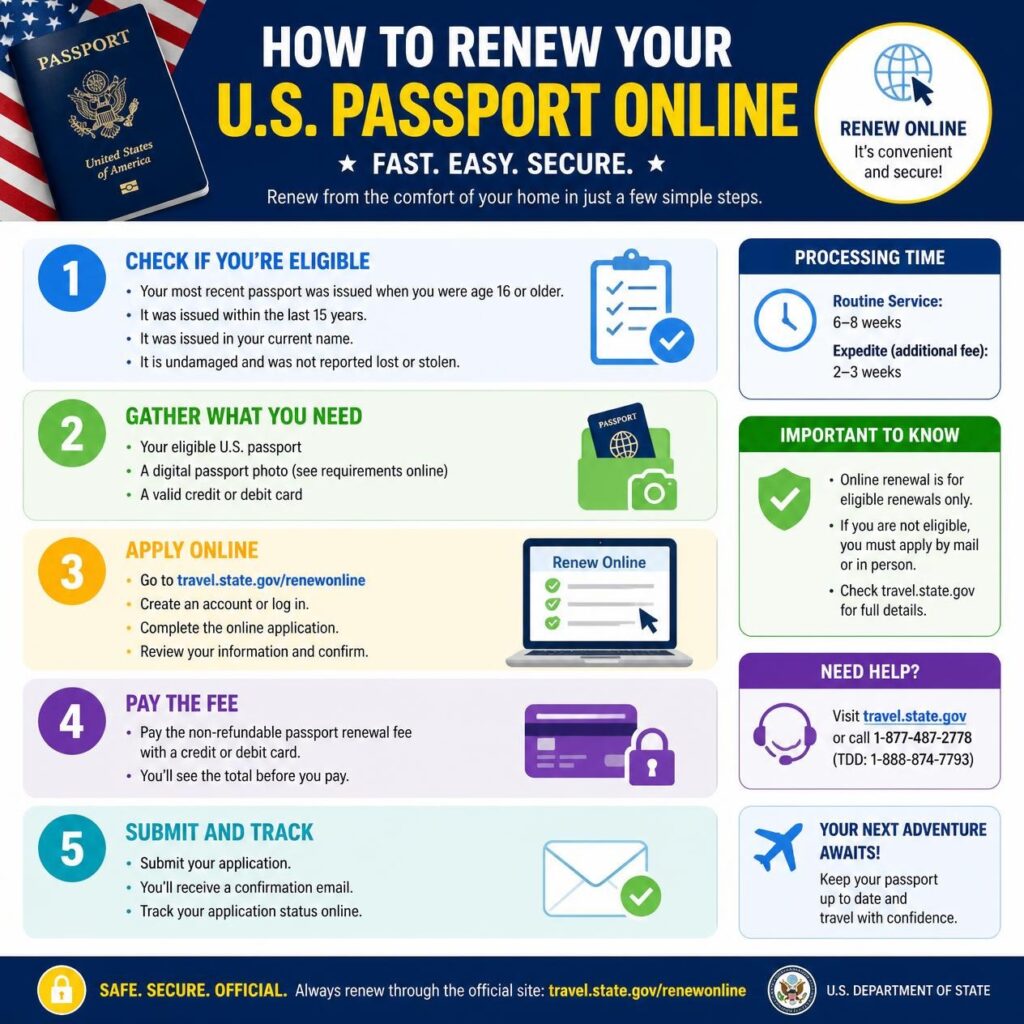
If you’re wondering “can you renew passport online USA”, the short answer is yes—but only if you meet the eligibility requirements established by the U.S. Department of State. Many U.S. citizens can now renew their passports online without mailing paper forms or visiting a passport acceptance facility. However, not everyone qualifies, so understanding the requirements before you apply is essential.
This comprehensive guide explains who can renew a U.S. passport online, who is not eligible, what documents you’ll need, current processing times, government fees, common mistakes to avoid, and expert tips for a smoother renewal experience.
Can You Renew a Passport Online in the USA?
Yes. Eligible U.S. citizens can renew their passport online through the official U.S. Department of State Online Passport Renewal system. To qualify, you must meet specific eligibility requirements regarding your current passport, age, travel plans, and application details. If you don’t qualify, you’ll need to renew by mail or apply in person.
International travel begins with a valid passport. Whether you’re planning a family vacation, an overseas business trip, studying abroad, or visiting loved ones, keeping your U.S. passport current is essential. Fortunately, renewing a passport has become easier than ever thanks to the U.S. Department of State’s online passport renewal service.
For many years, passport renewal required printing forms, writing checks, mailing documents, and waiting for updates through traditional mail. Today, eligible applicants can complete much of the process online from the comfort of their home. This digital option reduces paperwork, simplifies payment, and allows applicants to monitor the status of their application electronically.
That said, online renewal isn’t available to everyone. Certain eligibility rules determine whether you can use the online system or whether you’ll need to renew by mail or apply in person. Factors such as your passport’s condition, your age when it was issued, your upcoming travel plans, and whether you need to change personal information can all affect your eligibility.
Understanding these requirements before you begin can help you avoid delays, rejected applications, or unnecessary frustration. Taking a few minutes to gather the right documents and verify your eligibility can make the entire process smoother and more efficient.
In this guide, you’ll learn everything you need to know about online passport renewal in the United States, including:
- Who qualifies for online passport renewal
- Who must renew by mail or apply in person
- Required documents and digital photo guidelines
- Current passport renewal fees
- Typical processing times
- Step-by-step renewal instructions
- Common mistakes that delay applications
- Expert tips to help your application move smoothly
Expert Tip: If your passport expires within the next six months, consider renewing it now. Many countries require travelers to have at least six months of passport validity remaining before allowing entry.
Whether your passport is about to expire or has already expired within the allowable renewal period, this guide will walk you through the renewal process with clear, practical advice so you can travel with confidence.
Can You Renew a Passport Online in the USA?
The answer is yes—but only if you meet the eligibility requirements established by the U.S. Department of State. The online passport renewal system allows many eligible U.S. citizens to renew their passports without printing forms or mailing paper applications. Instead, qualified applicants can complete the process online, upload a digital passport photo, pay government fees electronically, and monitor their application status.
While online renewal has made the process more convenient, it is not available for every situation. Some applicants must still renew by mail or apply in person due to age, passport status, travel urgency, or other special circumstances.
Before starting your application, it’s important to determine whether you qualify. Doing so can help prevent delays and ensure you’re using the correct renewal method.
Quick Overview
| Question | Answer |
|---|---|
| Can you renew a U.S. passport online? | Yes, if you meet the official eligibility requirements. |
| Do all applicants qualify? | No. Some applicants must renew by mail or apply in person. |
| Can first-time applicants renew online? | No. First-time passport applicants must apply in person. |
| Can you upload your passport photo? | Yes. Eligible applicants submit a compliant digital passport photo. |
| Can you pay online? | Yes. Government fees are paid through the official online system. |
Why Did the U.S. Government Introduce Online Passport Renewal?
The U.S. Department of State introduced online passport renewal as part of its ongoing effort to modernize government services and improve the customer experience. As millions of Americans renew their passports each year, digital services help reduce paperwork, streamline processing, and make the application process more accessible.
Instead of relying entirely on mailed paper forms, eligible applicants can now complete much of the renewal process online. This saves time, minimizes mailing delays, and provides a more convenient way to submit applications.
Benefits for Travelers
For many eligible applicants, online renewal eliminates several traditional steps that were once required.
- No printing lengthy application forms.
- No purchasing postage or mailing supplies.
- No need to visit a passport acceptance facility for routine renewals.
- Electronic payment instead of mailing checks or money orders.
- Convenient application tracking through official updates.
These improvements make the renewal process simpler while maintaining the security standards required for government-issued travel documents.
Traditional Renewal vs. Online Renewal
| Traditional Mail Renewal | Online Passport Renewal |
|---|---|
| Paper application required | Digital application |
| Mail documents | Submit electronically (for eligible applicants) |
| Physical payment by check or money order | Secure online payment |
| Manual status updates | Electronic application updates |
| More paperwork | Less paperwork |
Best Practice: Even if online renewal is available to you, always review the latest eligibility requirements before submitting your application. Government policies and online service availability can change over time.
Why Eligibility Matters
Many applicants assume everyone can renew online, but that isn’t the case. The online system is intended for routine passport renewals that meet specific requirements. If your situation involves a lost passport, significant damage, certain personal information changes, or other special circumstances, you’ll likely need to follow a different application process.
Understanding the eligibility rules before beginning your application can help you avoid unnecessary delays and ensure your passport renewal is processed as efficiently as possible.
Who Can Renew a Passport Online?
Not every U.S. passport holder is eligible to renew online. The U.S. Department of State has established specific requirements to ensure the online renewal system is used for routine passport renewals.
If you meet the eligibility criteria, renewing online can save time and eliminate the need to mail paper forms. Before beginning your application, carefully review the following requirements.
You May Be Eligible If:
- You are a U.S. citizen with a passport eligible for renewal.
- Your most recent passport was issued when you were 16 years of age or older.
- Your passport is undamaged and in good condition.
- Your passport was issued with full validity.
- You can upload a passport photo that meets official requirements.
- You have a valid email address to receive application updates.
- You can pay the required government fees online.
Expert Tip
Before starting your application, gather your passport, payment method, and digital passport photo. Having everything ready will help you complete the application more efficiently.
Passport Photo Requirements
A compliant passport photo is one of the most important parts of your application. Photos that fail to meet official requirements may delay processing.
- Recent color photograph.
- Plain white or off-white background.
- Neutral facial expression.
- No sunglasses or face coverings unless permitted for medical or religious reasons.
- Good lighting with no heavy shadows.
- Clear, high-resolution image.
What You’ll Need Before You Begin
| Requirement | Purpose |
|---|---|
| Current passport | Identity verification |
| Digital passport photo | Application submission |
| Email address | Status notifications |
| Online payment method | Government fees |
| Personal information | Complete the application |
Who Cannot Renew a Passport Online?
Some applicants are not eligible for online renewal and must instead renew by mail or apply in person. These situations generally require additional identity verification or supporting documentation.
You Generally Cannot Renew Online If:
- You are applying for your first U.S. passport.
- Your passport has been lost or stolen.
- Your passport is severely damaged.
- Your previous passport was issued before you turned 16 years old.
- You require emergency or urgent passport service that cannot be completed through the online system.
- Your application requires additional documentation or special processing.
- Your identity cannot be verified through the standard online renewal process.
Common Situations That Require Another Renewal Method
| Situation | Likely Renewal Method |
|---|---|
| First-time passport application | Apply in person |
| Lost passport | Apply in person or follow replacement procedures |
| Stolen passport | Report the loss and apply for a replacement |
| Severely damaged passport | Apply in person |
| Child passport | Apply in person with parental requirements |
| Emergency travel needs | Contact a passport agency for urgent service |
Why Some Applicants Must Apply in Person
Applying in person allows passport officials to verify identity, review original documents, and ensure that all legal requirements are met. This additional verification helps protect applicants from identity theft and passport fraud.
If you’re unsure whether you qualify for online renewal, review the latest guidance from the U.S. Department of State before submitting your application. Using the correct renewal method can help avoid unnecessary delays.
Important: Never submit multiple passport renewal applications for the same passport unless instructed to do so by the U.S. Department of State. Duplicate applications may delay processing.
Benefits of Renewing Your Passport Online
For eligible applicants, renewing a U.S. passport online offers a faster and more convenient alternative to the traditional paper-based process. Instead of printing forms and mailing documents, you can complete much of the application from your computer or mobile device.
While processing times still depend on application volume and the service option you choose, the online renewal system simplifies the submission process and reduces paperwork.
Top Advantages of Online Passport Renewal
- Convenience: Complete your application from home or anywhere with a secure internet connection.
- Less Paperwork: No need to print lengthy application forms for eligible renewals.
- Secure Online Payments: Pay government fees electronically through the official system.
- Digital Status Updates: Receive email notifications and track your application progress.
- Reduced Mailing Hassles: Eliminate many of the risks associated with mailing paper applications.
- User-Friendly Process: Step-by-step online instructions help minimize application errors.
Online Renewal vs. Mail Renewal
| Feature | Online Renewal | Mail Renewal |
|---|---|---|
| Application Submission | Online | Paper Form |
| Payment | Electronic | Check or Money Order |
| Status Updates | Electronic Notifications | Limited Tracking |
| Paperwork | Minimal | More Documentation |
| Convenience | High | Moderate |
Documents You’ll Need Before Starting
Preparing your documents before beginning your application can save time and reduce the likelihood of delays. Although individual circumstances may vary, most eligible applicants should have the following items ready.
| Document | Why It’s Needed |
|---|---|
| Current U.S. Passport | Verify your identity and existing passport information. |
| Digital Passport Photo | Required for your online application. |
| Personal Information | Complete your renewal application accurately. |
| Email Address | Receive confirmation and application updates. |
| Accepted Payment Method | Pay applicable government fees securely online. |
| Travel Information (if applicable) | May help determine whether routine or expedited service is appropriate. |
Document Preparation Checklist
- Verify that your passport information is accurate.
- Prepare a compliant digital passport photo.
- Double-check your personal details before submission.
- Use a secure internet connection.
- Save copies of confirmation emails and payment receipts.
Is Online Passport Renewal Safe?
Yes. The official U.S. Department of State online passport renewal system uses secure technology to protect applicants’ personal and financial information. However, it’s important to remain cautious and use only official government resources when renewing your passport.
Online Security Best Practices
- Apply only through the official U.S. government passport website.
- Never share your login credentials with anyone.
- Verify website addresses before entering personal information.
- Avoid unofficial websites that promise guaranteed passport approval or expedited processing without authorization.
- Use a secure, private internet connection whenever possible.
- Keep copies of your application confirmation and payment receipt for your records.
Security Tip: Be cautious of third-party websites that charge additional fees simply to complete government forms. Whenever possible, submit your application directly through the official passport renewal system.
How to Renew Your Passport Online in the USA: Step-by-Step Guide
If you’re eligible, renewing your U.S. passport online is a straightforward process. The U.S. Department of State has designed the online renewal system to simplify the application while maintaining security and accuracy.
Following each step carefully can help reduce errors and prevent unnecessary processing delays.
Before You Begin
Have these items ready before starting your application:
- Your current U.S. passport
- A recent digital passport photo that meets official requirements
- A valid email address
- A debit card, credit card, or other accepted electronic payment method
- A secure internet connection
Step 1: Confirm Your Eligibility
Before accessing the online renewal system, make sure you meet the current eligibility requirements. The online service is intended for routine passport renewals and is not available for every applicant.
You should verify:
- Your passport qualifies for renewal.
- Your passport is not lost, stolen, or severely damaged.
- You meet the age and issuance requirements.
- Your travel plans allow enough processing time.
Expert Tip: Checking your eligibility first helps prevent wasted time and ensures you’re using the correct renewal method.
Step 2: Access the Official Online Passport Renewal System
Always use the official U.S. Department of State passport renewal website. Avoid unofficial websites that charge additional service fees or claim to guarantee approval.
The official system allows eligible applicants to:
- Complete the renewal application
- Upload required documents
- Submit a digital passport photo
- Pay passport fees securely
- Receive confirmation emails
- Track application progress
Step 3: Complete the Online Application
Enter your personal information exactly as it appears on your current passport unless you’re instructed to provide updated information.
Typical information requested includes:
- Full legal name
- Date of birth
- Place of birth
- Current mailing address
- Email address
- Passport information
- Emergency contact information (if requested)
Review every field carefully before continuing. Even small typographical errors can delay processing.
Step 4: Upload a Digital Passport Photo
Your passport photo must comply with official photo standards. Images that fail quality checks may require resubmission, delaying your application.
Digital Photo Guidelines
- Recent color photo
- Plain white or off-white background
- Face centered and looking directly at the camera
- Neutral facial expression
- No heavy shadows
- No filters or digital enhancements
- Clear, high-resolution image
| Requirement | Status |
|---|---|
| Color photo | Required |
| Plain white background | Required |
| Neutral expression | Required |
| Photo filters | Not Allowed |
| Blurry image | Not Accepted |
| Good lighting | Required |
Step 5: Review Your Application Carefully
Before submitting your application, review all information for accuracy.
Pay special attention to:
- Name spelling
- Date of birth
- Passport number
- Mailing address
- Email address
- Uploaded passport photo
Correcting mistakes after submission may require additional processing time.
Step 6: Pay the Government Passport Renewal Fee
After reviewing your application, you’ll be prompted to pay the applicable government fee using an accepted electronic payment method.
Depending on the options available at the time of your application, accepted payment methods may include:
- Credit cards
- Debit cards
- Electronic bank payments (where supported)
Once your payment is successfully processed, you’ll receive a confirmation indicating that your application has been submitted.
Save Your Confirmation
Download or print your payment receipt and confirmation email. Keeping these records can be helpful if you need to check your application status or contact passport support.
Step 7: Submit Your Application
After completing all required steps, submit your application through the official online portal.
Once submitted:
- Your application enters the review process.
- You should receive an email confirmation.
- Your application status will update as processing progresses.
- If additional information is required, you’ll receive instructions.
Quick Checklist: Online Passport Renewal Steps
- Confirm eligibility.
- Access the official passport renewal website.
- Complete the online application.
- Upload a compliant digital passport photo.
- Review your information carefully.
- Pay the government renewal fee.
- Submit your application.
- Track your application status.
U.S. Passport Renewal Fees
When renewing your U.S. passport online, you’ll need to pay the applicable government fee. The amount depends on the type of passport you request and whether you choose routine or expedited processing.
Passport fees are set by the U.S. Department of State and may change over time. Always verify the latest fee schedule before submitting your application.
Typical Passport Renewal Costs
| Passport Service | Government Fee |
|---|---|
| Adult Passport Book Renewal | Standard government fee |
| Adult Passport Card Renewal | Standard government fee |
| Passport Book + Passport Card | Combined government fee |
| Expedited Processing (Optional) | Additional government fee |
| Optional Expedited Return Shipping | Additional fee (if selected) |
Important: Government passport fees are subject to change. Check the official U.S. Department of State website for the most current pricing before completing your application.
What Your Passport Fee Covers
- Application processing
- Identity verification
- Passport production
- Security and fraud prevention measures
- Government administrative costs
How Long Does Online Passport Renewal Take?
Processing times vary throughout the year depending on application volume, staffing levels, holidays, and seasonal travel demand.
Routine applications generally take longer during peak travel seasons, especially before summer vacations and major holidays.
Factors That Affect Processing Time
- Routine vs. expedited processing
- Application accuracy
- Photo approval
- High seasonal demand
- Requests for additional documentation
- Unexpected government processing delays
Planning Ahead
Whenever possible, renew your passport several months before international travel. Many countries require your passport to remain valid for at least six months beyond your arrival date.
Typical Processing Timeline
| Processing Option | Typical Time Frame* |
|---|---|
| Routine Service | Several weeks (varies) |
| Expedited Service | Faster than routine processing (varies) |
*Actual processing times change throughout the year. Always review the latest estimates published by the U.S. Department of State.
Can You Expedite an Online Passport Renewal?
Yes. Eligible applicants may have the option to request expedited processing when available. Expedited service shortens the government’s processing time, although it does not guarantee delivery by a specific date.
When Expedited Service May Be Worth Considering
- Your international trip is approaching.
- Your passport expires soon.
- You need your renewed passport sooner than routine processing allows.
- You have upcoming work, study, or family travel.
Things to Remember About Expedited Processing
- An additional government fee applies.
- Faster processing does not guarantee approval.
- Incomplete applications can still cause delays.
- Poor-quality passport photos may require resubmission.
Expert Advice: Even if expedited processing is available, submit your renewal as early as possible. Waiting until the last minute increases the risk of travel disruptions.
How to Track Your Passport Renewal Application
After submitting your online renewal application, you can monitor its progress through the official passport status system.
Status updates generally become available after your application has entered the government’s processing system.
Your Application May Progress Through These Stages
- Application Submitted
- Payment Confirmed
- Application Received
- Under Review
- Additional Information Requested (if necessary)
- Passport Approved
- Passport Printed
- Passport Mailed
Tracking Tip
Save your confirmation email and any application reference numbers. You’ll need them if you contact passport support or check your application status.
Tips to Avoid Passport Renewal Delays
Many passport delays can be prevented by carefully reviewing your application before submission.
Best Practices
- Submit your renewal well before your planned travel.
- Use a passport photo that meets all official requirements.
- Double-check your personal information for accuracy.
- Pay the correct government fee.
- Monitor your email for application updates.
- Respond promptly if additional documentation is requested.
Common Reasons Applications Are Delayed
| Issue | Possible Result |
|---|---|
| Incorrect personal information | Application review delays |
| Unacceptable passport photo | Request for a replacement photo |
| Missing information | Additional processing time |
| High seasonal demand | Longer processing times |
| Incomplete application | Processing interruption |
Quick Summary: Fees & Processing
- Government fees depend on the passport product and service selected.
- Routine and expedited processing times vary throughout the year.
- Expedited service requires an additional government fee.
- Processing times are estimates and are not guaranteed.
- Applying early is the best way to avoid travel-related delays.
Common Mistakes to Avoid When Renewing Your Passport Online
Even though the online passport renewal process is designed to be user-friendly, simple mistakes can delay your application. Taking a few extra minutes to review your information before submission can help you avoid unnecessary processing delays.
1. Uploading an Unacceptable Passport Photo
One of the most common reasons passport applications require additional review is a photo that doesn’t meet official requirements.
Avoid photos that are:
- Blurry or low resolution
- Too dark or overexposed
- Taken with filters or excessive editing
- Using an incorrect background
- Showing sunglasses or prohibited accessories
- Older than recommended passport photo guidelines
Expert Tip: Carefully review the official passport photo requirements before uploading your image. A compliant photo can prevent unnecessary delays.
2. Entering Incorrect Personal Information
Your application should accurately match your current passport and supporting documentation. Small errors can lead to additional verification or requests for corrections.
Double-check:
- Your full legal name
- Date of birth
- Passport number
- Mailing address
- Email address
- Contact information
3. Waiting Until the Last Minute
Many travelers begin the renewal process only a few weeks before an international trip. Unfortunately, processing times can vary throughout the year, especially during busy travel seasons.
Whenever possible, submit your renewal well in advance of your planned departure date.
4. Ignoring Passport Validity Requirements
Many destinations require travelers to have at least six months of passport validity remaining beyond their arrival date.
Even if your passport hasn’t technically expired, renewing early may help you avoid travel complications.
5. Using Unofficial Websites
Only submit your passport renewal through the official U.S. Department of State website.
Some third-party websites charge additional fees simply to help users complete government forms. While some provide legitimate assistance, they cannot approve passport applications or guarantee faster processing.
6. Forgetting to Save Your Confirmation
After submitting your application, save your confirmation email and payment receipt.
These records can help if you need to:
- Track your application.
- Verify payment.
- Contact passport support.
- Reference your submission.
Expert Tips for a Smooth Passport Renewal
Passport professionals recommend following several best practices to help ensure your renewal is processed as efficiently as possible.
Start Early
Renew your passport several months before international travel whenever possible.
Review Everything Twice
Check every field carefully before clicking “Submit.”
Use a High-Quality Passport Photo
A compliant passport photo helps reduce requests for corrections.
Monitor Your Email
Watch for application updates or requests for additional information.
Keep Digital Copies
Save copies of your confirmation email, payment receipt, and any supporting documentation in a secure location.
Pro Tip
Create a dedicated folder for your passport renewal documents so you can quickly access confirmations, receipts, and travel records whenever needed.
Best Practices Before You Submit Your Application
Use this checklist before completing your online passport renewal.
| Checklist Item | Status |
|---|---|
| Verified eligibility | ☐ |
| Current passport available | ☐ |
| Digital passport photo meets requirements | ☐ |
| Personal information reviewed | ☐ |
| Email address confirmed | ☐ |
| Payment method ready | ☐ |
| Application reviewed before submission | ☐ |
| Confirmation email saved | ☐ |
Pros and Cons of Online Passport Renewal
| Pros | Cons |
|---|---|
| Apply from home | Not available to every applicant |
| Less paperwork | Requires internet access |
| Secure online payment | Strict digital photo requirements |
| Email status updates | Eligibility requirements must be met |
| User-friendly application process | Processing times still vary |
| No need to print routine renewal forms | Errors may delay approval |
Quick Tips for Faster Passport Renewal
- Apply several months before international travel.
- Verify you’re eligible for online renewal.
- Use a passport photo that meets official requirements.
- Review your application carefully before submitting.
- Pay the correct government fee.
- Save your confirmation email and payment receipt.
- Monitor your application status regularly.
Frequently Asked Questions
1. Can you renew your passport online in the USA?
Yes. Eligible U.S. citizens can renew their passports online through the official U.S. Department of State online passport renewal system. Applicants must meet the current eligibility requirements.
2. Who is eligible to renew a passport online?
Eligibility depends on several factors, including your age when your current passport was issued, the condition of your passport, and whether your application qualifies for routine renewal. Always review the latest eligibility requirements before applying.
3. Can I renew my passport online if it has expired?
In many cases, yes, provided your passport meets the government’s renewal requirements. If your passport falls outside those requirements, you may need to renew by mail or apply in person.
4. How long does online passport renewal take?
Processing times vary based on demand and the service option selected. Check the latest estimates published by the U.S. Department of State before submitting your application.
5. Can I request expedited passport renewal online?
Eligible applicants may be able to request expedited processing when available by paying the applicable additional government fee.
6. Do I need a new passport photo?
Yes. Online renewal requires a recent digital passport photo that complies with official U.S. passport photo requirements.
7. Can I travel while my passport renewal is being processed?
You generally need a valid passport for international travel. If your current passport has been submitted or is no longer valid, plan your travel accordingly and renew well before your departure date.
8. How can I check my passport renewal status?
You can monitor your application through the official U.S. Department of State passport status system after your application has been received and entered into processing.
9. What happens if my online application is incomplete?
If additional information or corrections are required, the U.S. Department of State may contact you with instructions. Respond promptly to help avoid additional delays.
10. Should I use a third-party passport website?
For the safest experience, submit your passport renewal directly through the official U.S. Department of State website. Be cautious of websites that charge extra fees or claim they can guarantee approval or faster processing.
Conclusion
If you’ve been asking, “Can you renew passport online USA?”, the answer is yes—provided you meet the current eligibility requirements established by the U.S. Department of State.
Online passport renewal offers a convenient way for many eligible U.S. citizens to complete the renewal process without mailing paper applications. By preparing your documents in advance, using a compliant digital passport photo, reviewing your application carefully, and applying early, you can improve your chances of a smooth and timely renewal experience.
Because passport policies, processing times, and fees may change, always verify the latest information through official government resources before submitting your application.